
FAQ schema is dead. Here's what to do about it.
 John Dwyer 5 min read
 If you’ve had a website for more than a year, there’s a good chance someone told you to add FAQ sections. The reason was usually the same: Google used to show those FAQs as an expandable rich snippet right in the search results, taking up extra screen space and drawing more clicks. That feature is now gone. Google retired the FAQ rich result in May 2026.
Here’s the calm version of this news, because most of what you’ll read elsewhere is either panicked or vague. Here’s what actually changed, what you should do with the markup you already have, and where to point that effort instead.
What changed (and what didn’t)
The thing that died is the visible snippet in search results. You know the one: a card with a little dropdown arrow next to each question, sitting between the page title and your URL. Google has stopped rendering those.
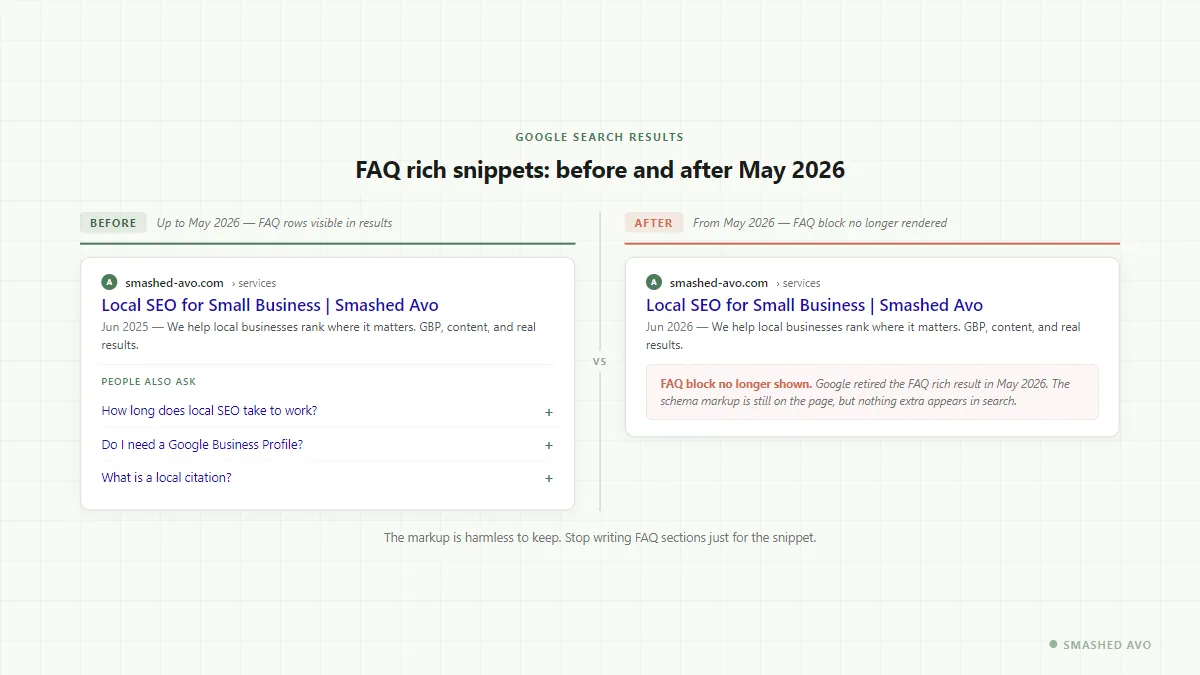
Before, on the left: the result with its expandable FAQ questions. After, on the right: the same result today, with that block gone.
The underlying FAQ schema markup (the structured data code on your pages) still works. Google continues to read it as part of how it understands your content. So if your site has FAQ schema in place, you don’t need to rip it out. Leave it. There’s no penalty for having it, and it still contributes to Google’s general understanding of your page.
What’s gone is any reason to build new FAQ sections specifically to chase that snippet.
The habit to drop
For a while, adding an FAQ block to every service page became almost automatic. Write eight questions, mark them up with schema, publish, and hope the search result gets bigger. A few agencies (and plenty of SEO tools) actively pushed this approach.
The habit wasn’t entirely wrong when the snippet existed. More search-result real estate genuinely helps click-through rates. The problem was that it led to FAQ sections written for Google, not for people. Formulaic questions, thin answers, same structure on every page.
With the rich result gone, there’s no search-result benefit left to justify that approach. You’re adding content that doesn’t particularly help your visitors and no longer earns you extra space on the results page.
What to do with the FAQ content you already have
Go through it honestly. Ask whether each FAQ section actually helps a visitor who’s arrived on that page.
If the answer is yes, keep it. Good FAQ content earns its place. It answers real objections, saves your team from explaining the same things by phone, and gives Google something genuinely useful to read.
If the FAQ was added purely because someone said “put schema on every page,” you can remove it. Or leave it as-is and just stop adding more.
The one thing you don’t need to do is stress about it. Google isn’t penalising pages that have FAQ schema. It’s just not rewarding them with a visible snippet anymore.
Where to put that time instead
This is the part worth focusing on. The time you were spending on FAQ writing is worth reinvesting somewhere with a clear, measurable return.
For local-services businesses (tradies, consultants, clinics, anyone with a physical service area), the highest-ROI play right now is your Google Business Profile. Specifically, your photos.
There’s a strong correlation between GBP accounts that have crossed the 100-image mark and the volume of calls and direction-requests those accounts generate. That’s not a coincidence. Google treats a well-maintained GBP like a signal of an active, trustworthy business.
Most businesses we work with are well below 100 images. The fix is straightforward: start uploading consistently.
The most efficient way to do this is to connect your Instagram account to your GBP so photos flow across automatically. You upload once to Instagram (a before-and-after shot, a job site, a finished install, your team at work), and that same image appears on your Business Profile. The only ongoing cost is the Instagram upload you’d likely do anyway.
We’ll have a full walkthrough of setting that up shortly.
For ecommerce businesses, the reinvestment looks a bit different. Your GBP matters if you have a physical shopfront or service area, but the bigger lever is usually your product content and internal linking. If you’ve had pages sitting in Google’s “discovered but not indexed” bucket, that’s a separate fix worth looking at.
Reviews while you’re there
While you’re thinking about your GBP, respond to your reviews. Every one of them. A short, genuine response to a five-star review takes 30 seconds and signals to Google (and to the next person reading) that there’s an active business behind the listing.
If you have unanswered reviews sitting there from months ago, work through them this week. Then set a habit: check once a week, respond to anything new.
A quick heads-up
We use privacy-friendly analytics to see how people enjoy the site. We don't track who you are or your identity. Privacy Policy